LERIS PRC Online Appointment: Book, Reschedule & Cancel 2026
Disclaimer: This website is not affiliated with the Professional Regulation Commission (PRC) or the Philippine government. All information is sourced from official PRC channels and published for guidance only.
Last Updated: July 2026
Whether you are renewing your license, filing initial registration, or applying for a board exam — every PRC transaction ends at the same gate: the appointment. This guide covers the LERIS PRC online appointment system end to end: how to book, how slots actually work, what to do when none appear, and how to handle rescheduling or a missed date.
How the PRC Appointment System Works
PRC does not accept walk-in transactions without a prior online appointment for most services. The appointment is not a separate booking website — it is a built-in step inside every LERIS transaction:
- You select a transaction (renewal, initial registration, exam application, duplicate ID, certification).
- LERIS asks you to pick a PRC office and an available date.
- You pay, print your slip, and appear on that date.
One appointment covers one transaction. There is no standalone “book an appointment first, decide the transaction later” option — the transaction always comes first.
(No LERIS account yet? Start with our Create a PRC LERIS Account guide — the system blocks appointments until your profile is 100% complete.)
LERIS PRC Online Appointment Steps (How to Book)
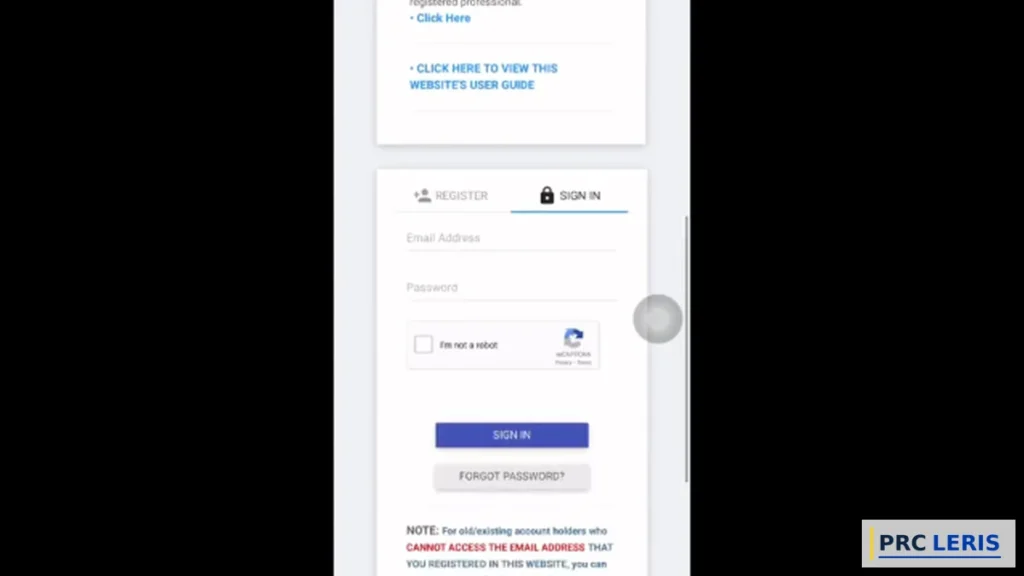
Step 1: Sign In at online.prc.gov.ph
Log in at online.prc.gov.ph with your registered email and password. Locked out? Fix it first — our LERIS Login & Recovery guide covers every scenario.
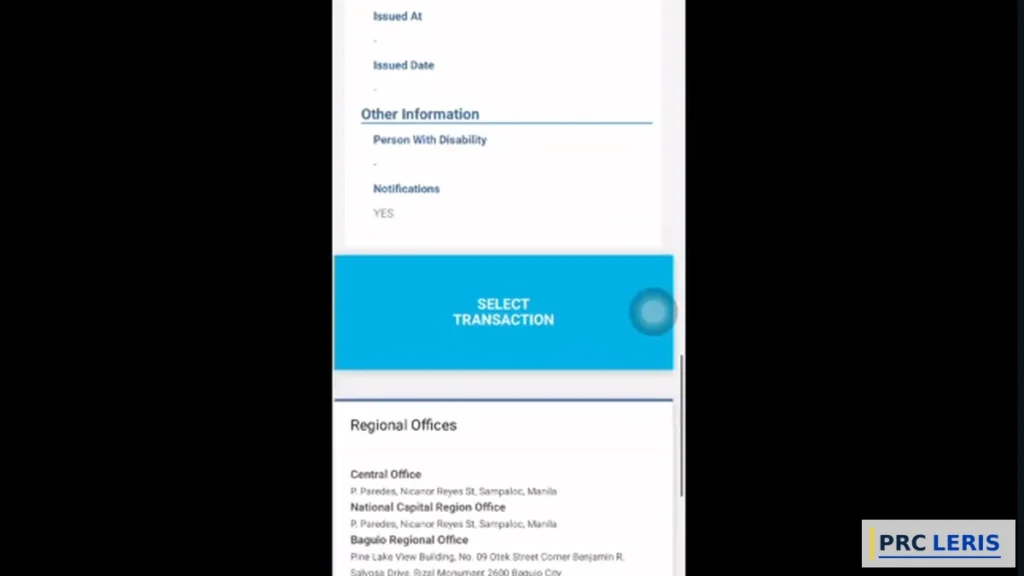
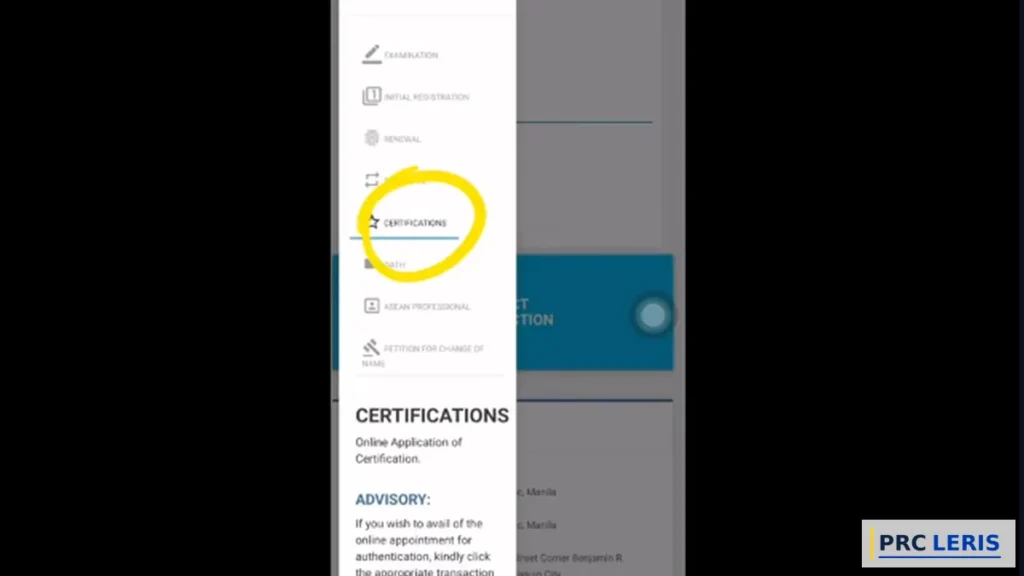
Step 2: Click “Select Transaction”
Choose the service you need: Examination, Initial Registration, Renewal, Duplicate, Certification, or Authentication. Fill in the transaction details the system asks for.
Step 3: Choose Your PRC Office
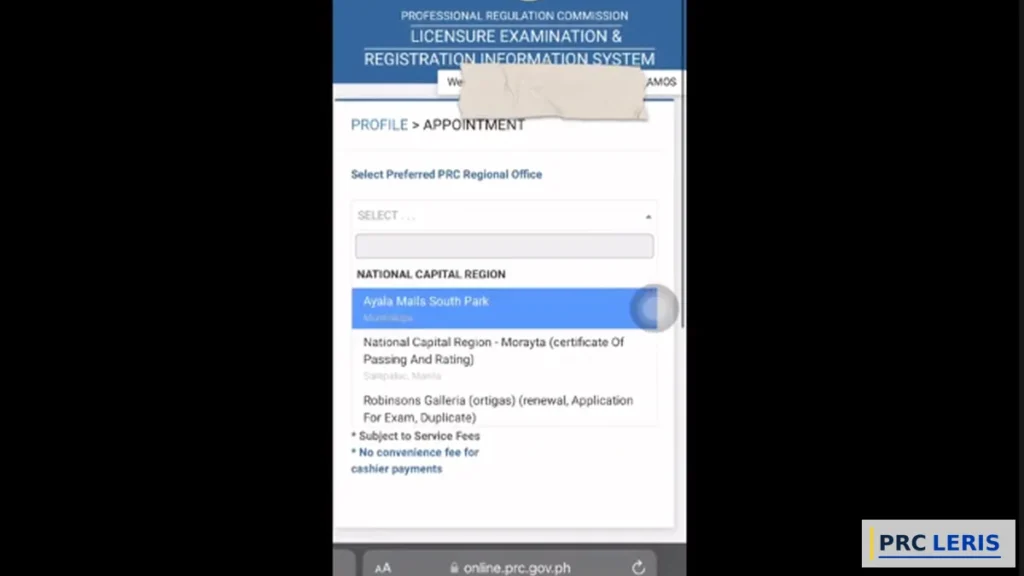
A drop-down lists PRC regional offices and service centers. Pick the most convenient — but stay flexible; office choice is your biggest lever when slots are scarce. (Full office list: our PRC Office Locations directory.)
Step 4: Pick Your Appointment Date
LERIS automatically offers the earliest available date at your chosen office. Want a different day? Click “View Other Dates” and select from the calendar — dates in gray are full.
Why this matters: the earliest-date default exists because most people need the transaction done fast. Only browse other dates if your schedule truly requires it — open slots disappear while you scroll.
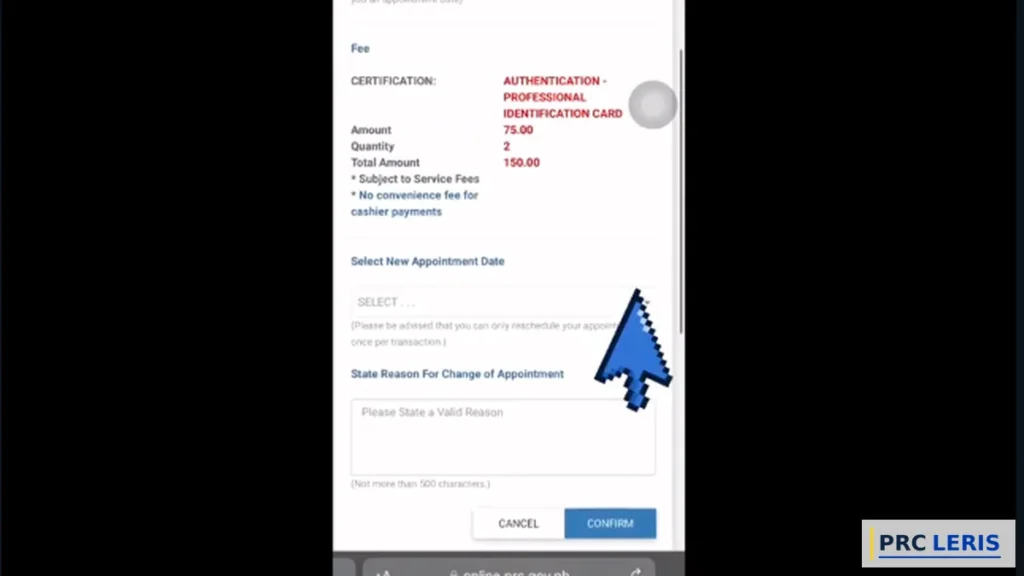
Step 5: Confirm and Pay
Review the appointment summary (office, date, fee), then pay via GCash, Maya, LandBank, card, or choose cashier payment for the appointment day. Screenshot the reference number. (Payment options: PRC Payment Methods.)
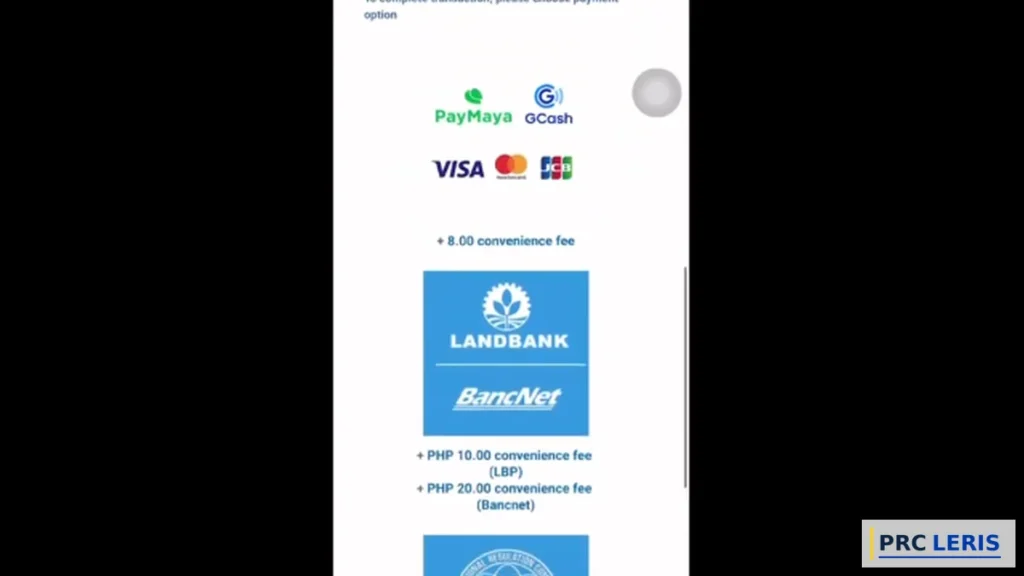
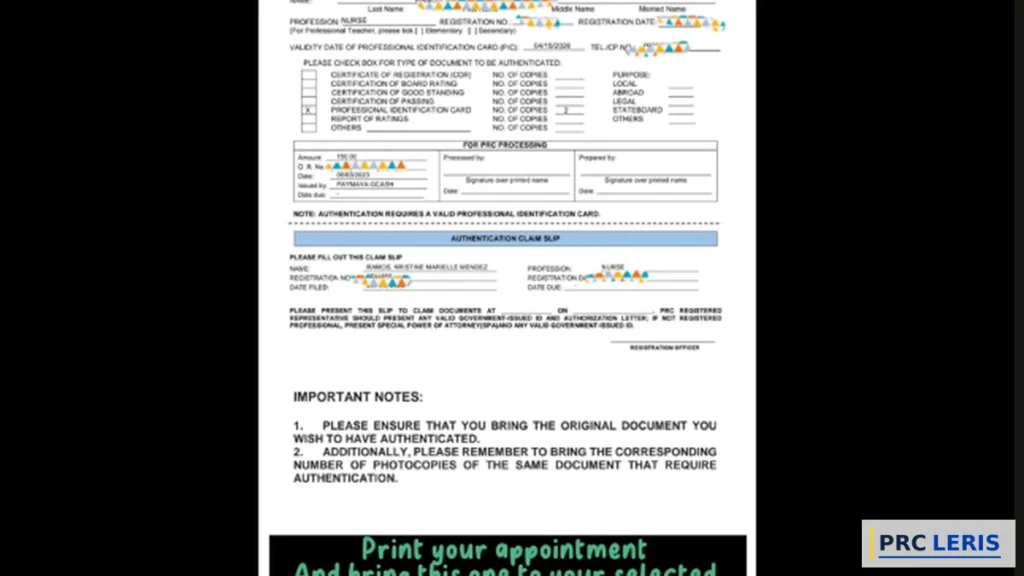
Step 6: Print Your Appointment Slip and Application Form
Print both documents. Your slot is confirmed the moment payment is acknowledged.
Step 7: Appear on Your Date — Not Before, Not After
PRC enforces a strict same-date policy: the office serves you only on the scheduled day. Arrive early within the day, bring your printed documents, valid ID, and the transaction-specific requirements. (Dress decently — some offices enforce attire rules at the door.)
How PRC Appointment Slots Work (Read Before Booking)
Three mechanics explain almost every slot frustration:
- Slots release in batches, not all at once. Offices open new dates progressively — an empty calendar today can show openings tomorrow morning.
- Peak seasons drain slots fast. The weeks after board exam results (initial registration rush) and exam filing deadlines are the worst. Renewal demand also spikes at month-ends.
- Each office has its own pool. A fully booked Manila office says nothing about the office one city over.
No Slots Available? 6 Fixes That Work
Fix 1: Check Early Mornings, Daily
New batches typically appear at the start of the day. A 7–9 AM check for three consecutive days beats refreshing all afternoon once.
Fix 2: Switch to a Nearby Regional Office
The appointment is valid at whichever office you select. A one-hour trip to the next city routinely saves a three-week wait.
Fix 3: Try a Mall Service Center
Selected SM and Robinsons PRC service desks carry their own slot pools — often lighter than main offices, and open on weekends.
Fix 4: Use “View Other Dates” Fully
Don’t stop at the first gray week. Slots open mid-calendar when others cancel or fail to pay — scan the whole month.
Fix 5: Complete Payment Immediately
Unpaid transactions can lose their hold. Pay the moment you confirm the date — hesitation returns your slot to the pool.
Fix 6: Avoid the Post-Results Rush If You Can
Initial registration has no strict deadline. Waiting two or three weeks after the results frenzy often means walking into an open calendar.
How to Reschedule or Cancel a PRC Appointment
- Before your payment is validated: the appointment isn’t locked yet — log in, open the transaction, and adjust the date/office freely.
- After payment validation: LERIS locks the slot — the portal itself no longer reschedules a confirmed appointment.
- The locked-slot route: email PRC before your appointment date with your full name, transaction reference number, and the requested change. Include a screenshot of your appointment slip.
- Paid fees are generally tied to the transaction, not the date — rescheduling does not mean paying again. Never file a duplicate transaction just to grab a new date; duplicate records create bigger problems than a missed slot.
What Happens If You Miss Your Appointment
Missing the date does not automatically void your payment — but it does void the slot. Do this:
- Log in to LERIS and open the same transaction — if a set new appointment option is available, book a fresh date.
- No option? Email PRC (with your reference number and payment proof) and request the appointment be reset.
- Act quickly — payments and application validity have limits, and slots refill fast.
A little more detail (so it never fails): keep the payment reference screenshot from booking day. It is the single document that keeps a missed appointment recoverable instead of restart-from-zero.
Appointment Options Comparison Table
| Option | Where | Slot Availability | Best For |
|---|---|---|---|
| Main regional office | Major cities | Tightest — highest demand | Complex transactions, corrections |
| Nearby regional office | Adjacent cities | Usually better | Beating metro congestion |
| Mall service center | Selected SM/Robinsons | Own pool, weekend hours | Renewals, quick claims |
| Priority lane (walk-in) | Regional offices | Same-day queue | Seniors, PWDs, pregnant women |
So, booking online at a nearby regional office or mall service center is the best method when your first-choice office is full — the transaction is identical everywhere, and only the queue length changes.
Tips for Getting the Slot You Want
Book the Transaction the Day You Decide
Slots reward speed. The gap between “I should renew” and “I booked” is where good dates vanish.
Keep Your Profile at 100% Before You Need a Slot
Profile errors block the transaction page entirely. Fix your account on a quiet day, not booking day.
Screenshot the Appointment Summary Before Paying
Office, date, fee — captured. Disputes resolve in minutes when you have the summary.
Set a Phone Reminder for the Appointment
Missed dates are the most self-inflicted PRC problem. Two reminders: the night before and the morning of.
Go Morning on the Day Itself
Same-day card and document release favors early arrivals. Afternoon queues roll into “come back tomorrow.”
Bring Duplicates of Everything Printed
Two copies of the slip and application form cost pesos and save re-printing runs outside the office.
Don’t Book Peak Mondays
Mid-week appointments consistently move faster inside PRC offices.
Never Buy Slots From Fixers
Slot-selling accounts are scams that collect payments against records they don’t control. Every legitimate slot is free on LERIS.
PRC Contact Information
| Concern | Contact |
|---|---|
| Appointment & transaction issues | [email protected] |
| Applications | [email protected] |
| General inquiries | [email protected] |
| Feedback (CRMS) | crms.prc.gov.ph/feedbackform |
Official portal: online.prc.gov.ph · Facebook: facebook.com/PRCphl
Frequently Asked Questions (FAQs)
How to book a PRC appointment online? Log in at online.prc.gov.ph, click Select Transaction, complete the transaction details, choose a PRC office and date, pay, and print your appointment slip.
Is there a separate PRC appointment website? No — the appointment is a built-in step of every LERIS transaction at online.prc.gov.ph.
Why are there no PRC appointment slots available? Slots release in batches and drain fast in peak seasons — check early mornings, switch offices, or try a mall service center.
When do new PRC slots open? Progressively, typically at the start of the day — a daily 7–9 AM check catches fresh batches.
Can I walk in to PRC without an appointment? Generally no — only priority lanes (seniors, PWDs, pregnant women) accommodate walk-ins at most offices.
Can I choose a different date than the one LERIS offers? Yes — click View Other Dates and pick any open date on the calendar.
Can I book a PRC appointment at a different city’s office? Yes — office choice is yours, and switching cities is the fastest fix for full calendars.
How to reschedule a PRC appointment? Freely in LERIS before your payment is validated; once confirmed, the slot locks — email PRC with your reference number before the date to request a change.
How to cancel a PRC appointment? Contact PRC with your transaction reference — and never file a duplicate transaction to replace it.
What if I miss my PRC appointment? Log in and set a new appointment if the option appears, or email PRC with your payment reference to reset the date.
Is my payment lost if I miss the appointment? Generally no — the fee ties to the transaction, but act quickly and keep your payment screenshot.
Can I have two PRC appointments at once? One appointment per transaction — separate transactions (e.g., renewal + certification) each carry their own slot.
What do I bring on my PRC appointment date? The printed appointment slip, application form, valid ID, and the specific requirements LERIS listed for your transaction.
Can someone else attend my PRC appointment? Biometric steps require you personally; document claiming can be delegated with an authorization letter or SPA.
Do mall PRC service centers take online appointments? Yes — they appear as office options inside LERIS and hold their own slot pools.
How early should I arrive for my PRC appointment? Within office hours on your date, ideally morning — same-day releases favor early queues.
Can I book a PRC appointment for a board exam? Yes — the exam application transaction includes the appointment for document verification.
Why does LERIS block me before the appointment step? An incomplete profile — push it to 100% (photo included) and the transaction pages unlock.
Is booking a PRC appointment free? The appointment itself has no separate fee — you pay only the transaction’s own fee.
Paano mag-book ng PRC appointment online? Mag-login sa online.prc.gov.ph, piliin ang transaction, pumili ng PRC office at petsa, magbayad, at i-print ang appointment slip.
Paano mag-reschedule ng PRC appointment? Kung hindi pa validated ang bayad, baguhin sa LERIS mismo. Kung confirmed na, mag-email sa [email protected] bago ang petsa — isama ang reference number at screenshot ng appointment slip.
Final Thoughts
The appointment system is simple; the slot game is not. Win it with three habits: book the moment you decide, check mornings when calendars look full, and treat office choice as flexible. The professionals who wait weeks are almost always the ones refreshing one office’s calendar at 4 PM. And once you’ve secured the slot, every transaction follows the same pattern — whether it’s renewing your license or filing for an exam.
Everything runs through online.prc.gov.ph — no separate booking site, no paid slots, no fixers.